> ## Documentation Index
> Fetch the complete documentation index at: https://docs.enkryptai.com/llms.txt
> Use this file to discover all available pages before exploring further.
# OpenAI Compliance API Integration
> Connect Enkrypt AI Guardrails to the OpenAI Compliance API to monitor your ChatGPT Enterprise workspace
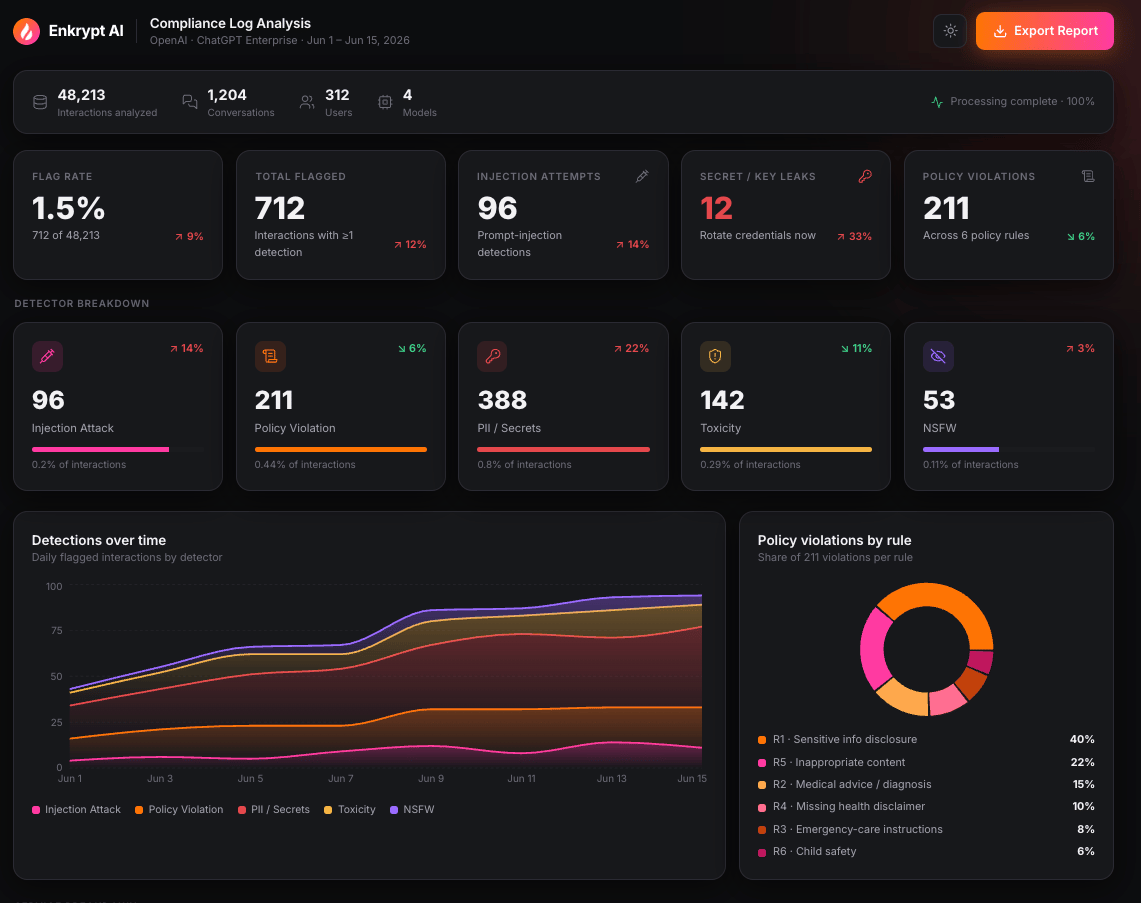
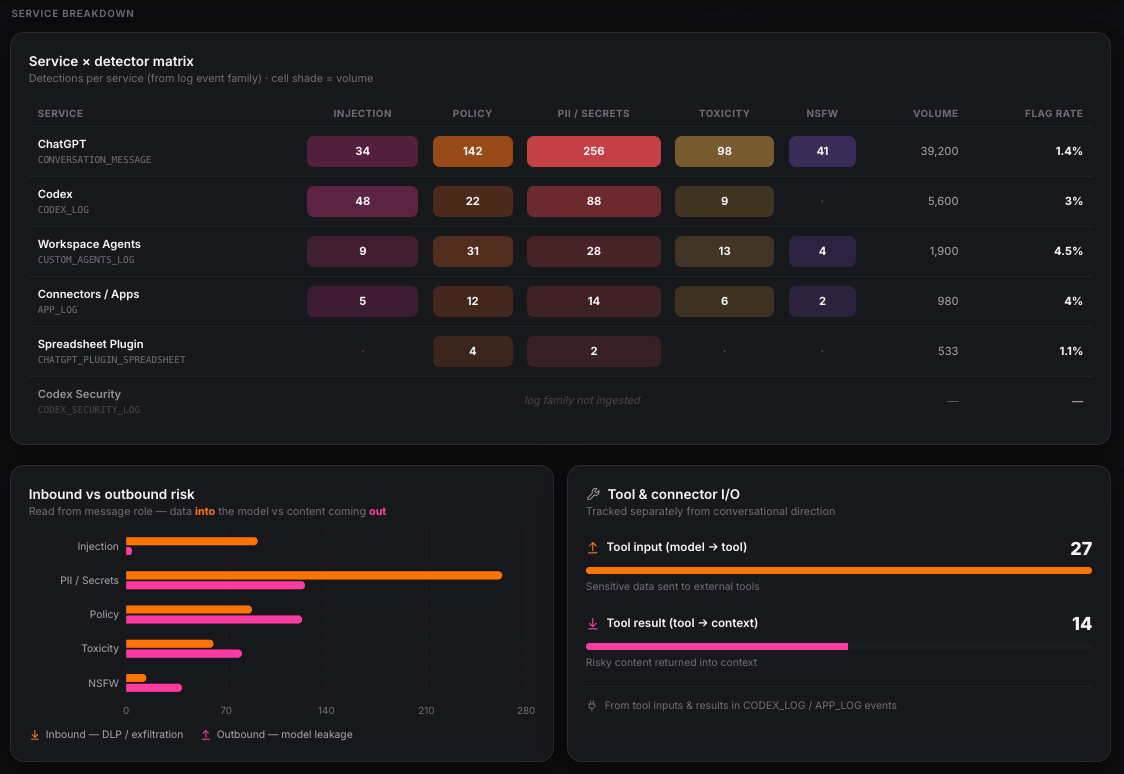 Enkrypt AI is an official OpenAI compliance partner. This integration connects [Enkrypt AI Guardrails](/get-started/introduction) to the OpenAI Compliance API so you can monitor everything happening inside your ChatGPT Enterprise workspace and review it in a single compliance dashboard.
## How this differs from inline guardrails
Enkrypt AI guardrails are normally deployed inline. You call the [detect API](/api-reference/guardrails-api-reference/endpoint/detect) from inside your own application's request path, and the guardrail evaluates each prompt and response as it happens, blocking or redacting before anything reaches the user.
That model depends on owning the request path. ChatGPT Enterprise is a third-party application, so there is nothing to sit inside. You cannot place a guardrail between your employees and ChatGPT.
This integration solves the same problem from the other direction. Instead of intercepting traffic, it reads the record of what already happened from the OpenAI Compliance API and evaluates it. That changes what the guardrails can do for you:
* **Workspace-wide, not request-scoped.** A single detect call tells you about one prompt. Here you get the posture of the entire workspace, including which services carry the most risk, which users account for the most findings, and how any of that is trending.
* **Retrospective, not preventive.** Nothing is blocked, because the interaction has already occurred. The value is visibility, evidence, and the ability to act on what you find.
* **Evaluated against your own rules, not just generic harm categories.** This is the part most inline deployments do not cover.
### Your rules, not just generic harms
Alongside detection for prompt injection, PII leakage, toxicity, and NSFW content, every interaction is evaluated against an AI usage policy that you define. This is what lets the integration catch problems that are specific to your organization rather than universally unsafe, such as:
* Attempts to move confidential material out of the organization, including customer records, employee data, internal documents, credentials, and proprietary source code
* Regulated advice being requested or produced, such as medical diagnoses, treatment plans, or prescriptions
* Advice on sensitive topics being given without the disclaimers your compliance team requires
* Discussion of subjects you have placed off limits for AI use
When something is flagged, the finding identifies which of your rules was broken, so a violation points at a specific line in your policy rather than a generic category.
## What is covered
ChatGPT Enterprise is more than a chat window, so the integration follows the work across the workspace:
* **ChatGPT conversations** across web, desktop, and mobile clients, including sessions initiated through the ChatGPT API client surface
* **Codex activity** across the CLI, IDE extensions, web, and SDK, covering prompts, responses, and the tool and MCP calls Codex makes
* **Custom agents**, including agent run messages and the instructions agents are configured with
* **Connectors**, covering queries sent to connected external apps and the results returned into context
* **The ChatGPT spreadsheet plugin**
Coverage extends beyond message text to the contents of files users upload during a conversation.
### What is not covered
This integration monitors your ChatGPT Enterprise workspace. It does not cover applications your developers build on the OpenAI Platform API, because that traffic does not pass through the ChatGPT Enterprise compliance logs.
To protect those applications, deploy Enkrypt AI guardrails inline in the application request path using the [detect API](/api-reference/guardrails-api-reference/endpoint/detect), where they can block and redact in real time. Used together, the two approaches cover both sides of your OpenAI footprint: the workspace your employees use, and the applications your engineers build.
## Read-only by design
The integration is read only. Enkrypt AI does not modify, block, or delete anything in your ChatGPT Enterprise workspace, and end users see no change in their experience. Remediation stays with your administrators.
## How it works
```plain text theme={"system"}
ChatGPT Enterprise workspace
│
▼
OpenAI Compliance API (immutable log files, grouped by event type)
│
▼
Enkrypt AI ingestion (download, decompress, parse, de-duplicate)
│
▼
Enkrypt AI guardrails (scan each monitorable interaction)
│
▼
Compliance dashboard (KPIs, per-service stats, findings, framework mapping)
```
1. You provide a Compliance API key and workspace ID.
2. Enkrypt AI retrieves the compliance log files for the sources and time range you select.
3. Every monitorable interaction is extracted, including prompts, responses, tool inputs and outputs, and the contents of uploaded files.
4. Each item is scanned by the guardrail detectors you enabled.
5. Results are aggregated into a dashboard with drill-down to individual findings.
## Prerequisites
Before you begin, make sure you have the following.
| Requirement | Details |
| ----------------------------------- | -------------------------------------------------------------------------------------------------------------------------------------------------------------------- |
| ChatGPT Enterprise or Edu workspace | The Compliance API is available to Enterprise and Edu customers. Contact your OpenAI account team if you are unsure of your entitlement. |
| Compliance API access enabled | Must be granted by OpenAI for your organization and for the specific API key you will use. See [Enable Compliance API access](#step-1-enable-compliance-api-access). |
| Compliance API key | An Admin API key created in the OpenAI Platform, scoped to `read`. |
| Workspace ID | Found in your ChatGPT admin settings. |
| Enkrypt AI account | With permission to configure integrations. |
Compliance API access is granted by OpenAI on a per key basis. Complete this step before configuring the integration in Enkrypt AI.
1. Sign in to the OpenAI Platform as an organization owner.
2. Confirm the correct organization is selected. It must be the organization backing your ChatGPT Enterprise workspace, not a personal organization. A mismatch here is the most common cause of enablement failure.
3. Create a new Admin API key. Note that:
* The key must be newly created. Existing keys cannot be retrofitted.
* The key value is displayed only once, so store it securely.
* We recommend using a service account key rather than a key tied to an individual user, so access is not lost when someone leaves.
4. Email `support@openai.com` and request Compliance API access. Include:
* The last four digits of the API key
* The key name
* The name of the person who created it
* The requested scope
Request the `read` scope only. Enkrypt AI never requires `delete`.
5. OpenAI verifies the key and grants the Compliance API scopes. Once granted, other scopes on that key are revoked, so the key becomes dedicated to compliance use.
Access is granted to the key, not to your account. If you rotate the key, you must repeat this request for the new key.
Your workspace ID is available at `chatgpt.com/admin/settings` in your ChatGPT Enterprise admin console. Copy the value for use in the next step.
Enkrypt AI is an official OpenAI compliance partner. This integration connects [Enkrypt AI Guardrails](/get-started/introduction) to the OpenAI Compliance API so you can monitor everything happening inside your ChatGPT Enterprise workspace and review it in a single compliance dashboard.
## How this differs from inline guardrails
Enkrypt AI guardrails are normally deployed inline. You call the [detect API](/api-reference/guardrails-api-reference/endpoint/detect) from inside your own application's request path, and the guardrail evaluates each prompt and response as it happens, blocking or redacting before anything reaches the user.
That model depends on owning the request path. ChatGPT Enterprise is a third-party application, so there is nothing to sit inside. You cannot place a guardrail between your employees and ChatGPT.
This integration solves the same problem from the other direction. Instead of intercepting traffic, it reads the record of what already happened from the OpenAI Compliance API and evaluates it. That changes what the guardrails can do for you:
* **Workspace-wide, not request-scoped.** A single detect call tells you about one prompt. Here you get the posture of the entire workspace, including which services carry the most risk, which users account for the most findings, and how any of that is trending.
* **Retrospective, not preventive.** Nothing is blocked, because the interaction has already occurred. The value is visibility, evidence, and the ability to act on what you find.
* **Evaluated against your own rules, not just generic harm categories.** This is the part most inline deployments do not cover.
### Your rules, not just generic harms
Alongside detection for prompt injection, PII leakage, toxicity, and NSFW content, every interaction is evaluated against an AI usage policy that you define. This is what lets the integration catch problems that are specific to your organization rather than universally unsafe, such as:
* Attempts to move confidential material out of the organization, including customer records, employee data, internal documents, credentials, and proprietary source code
* Regulated advice being requested or produced, such as medical diagnoses, treatment plans, or prescriptions
* Advice on sensitive topics being given without the disclaimers your compliance team requires
* Discussion of subjects you have placed off limits for AI use
When something is flagged, the finding identifies which of your rules was broken, so a violation points at a specific line in your policy rather than a generic category.
## What is covered
ChatGPT Enterprise is more than a chat window, so the integration follows the work across the workspace:
* **ChatGPT conversations** across web, desktop, and mobile clients, including sessions initiated through the ChatGPT API client surface
* **Codex activity** across the CLI, IDE extensions, web, and SDK, covering prompts, responses, and the tool and MCP calls Codex makes
* **Custom agents**, including agent run messages and the instructions agents are configured with
* **Connectors**, covering queries sent to connected external apps and the results returned into context
* **The ChatGPT spreadsheet plugin**
Coverage extends beyond message text to the contents of files users upload during a conversation.
### What is not covered
This integration monitors your ChatGPT Enterprise workspace. It does not cover applications your developers build on the OpenAI Platform API, because that traffic does not pass through the ChatGPT Enterprise compliance logs.
To protect those applications, deploy Enkrypt AI guardrails inline in the application request path using the [detect API](/api-reference/guardrails-api-reference/endpoint/detect), where they can block and redact in real time. Used together, the two approaches cover both sides of your OpenAI footprint: the workspace your employees use, and the applications your engineers build.
## Read-only by design
The integration is read only. Enkrypt AI does not modify, block, or delete anything in your ChatGPT Enterprise workspace, and end users see no change in their experience. Remediation stays with your administrators.
## How it works
```plain text theme={"system"}
ChatGPT Enterprise workspace
│
▼
OpenAI Compliance API (immutable log files, grouped by event type)
│
▼
Enkrypt AI ingestion (download, decompress, parse, de-duplicate)
│
▼
Enkrypt AI guardrails (scan each monitorable interaction)
│
▼
Compliance dashboard (KPIs, per-service stats, findings, framework mapping)
```
1. You provide a Compliance API key and workspace ID.
2. Enkrypt AI retrieves the compliance log files for the sources and time range you select.
3. Every monitorable interaction is extracted, including prompts, responses, tool inputs and outputs, and the contents of uploaded files.
4. Each item is scanned by the guardrail detectors you enabled.
5. Results are aggregated into a dashboard with drill-down to individual findings.
## Prerequisites
Before you begin, make sure you have the following.
| Requirement | Details |
| ----------------------------------- | -------------------------------------------------------------------------------------------------------------------------------------------------------------------- |
| ChatGPT Enterprise or Edu workspace | The Compliance API is available to Enterprise and Edu customers. Contact your OpenAI account team if you are unsure of your entitlement. |
| Compliance API access enabled | Must be granted by OpenAI for your organization and for the specific API key you will use. See [Enable Compliance API access](#step-1-enable-compliance-api-access). |
| Compliance API key | An Admin API key created in the OpenAI Platform, scoped to `read`. |
| Workspace ID | Found in your ChatGPT admin settings. |
| Enkrypt AI account | With permission to configure integrations. |
Compliance API access is granted by OpenAI on a per key basis. Complete this step before configuring the integration in Enkrypt AI.
1. Sign in to the OpenAI Platform as an organization owner.
2. Confirm the correct organization is selected. It must be the organization backing your ChatGPT Enterprise workspace, not a personal organization. A mismatch here is the most common cause of enablement failure.
3. Create a new Admin API key. Note that:
* The key must be newly created. Existing keys cannot be retrofitted.
* The key value is displayed only once, so store it securely.
* We recommend using a service account key rather than a key tied to an individual user, so access is not lost when someone leaves.
4. Email `support@openai.com` and request Compliance API access. Include:
* The last four digits of the API key
* The key name
* The name of the person who created it
* The requested scope
Request the `read` scope only. Enkrypt AI never requires `delete`.
5. OpenAI verifies the key and grants the Compliance API scopes. Once granted, other scopes on that key are revoked, so the key becomes dedicated to compliance use.
Access is granted to the key, not to your account. If you rotate the key, you must repeat this request for the new key.
Your workspace ID is available at `chatgpt.com/admin/settings` in your ChatGPT Enterprise admin console. Copy the value for use in the next step.
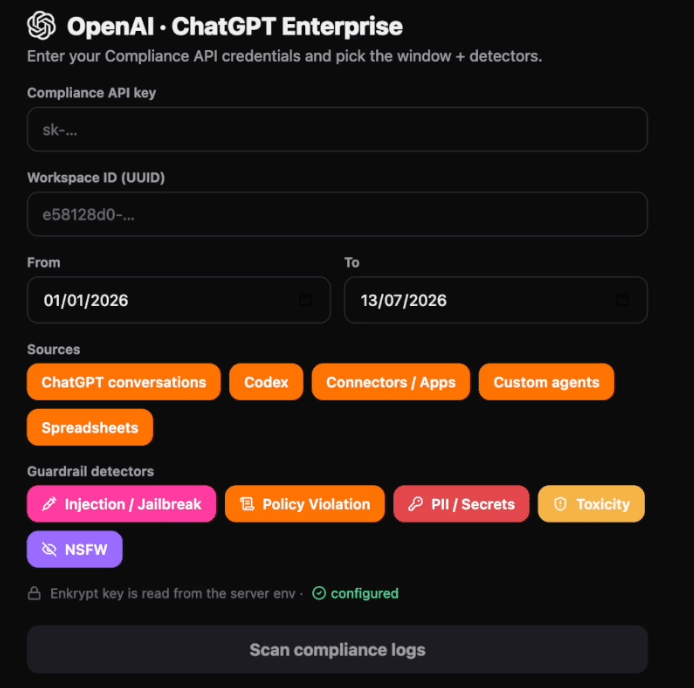 In the Enkrypt AI platform, open the OpenAI Compliance integration and provide your credentials.
| Field | Value |
| ------------------ | --------------------------------------------------------- |
| Compliance API key | The Admin API key granted Compliance API scopes in Step 1 |
| Workspace ID | Your ChatGPT Enterprise workspace ID from Step 2 |
#### Select a time range
Choose the period you want to analyze. Enkrypt AI retrieves and scans all log files whose events fall inside this window.
For ongoing monitoring, run scans on a recurring schedule so each scan picks up where the previous one ended.
OpenAI retains compliance log files for 30 days. Events older than the retention window cannot be retrieved. Schedule recurring scans at an interval well inside 30 days to avoid gaps in coverage.
#### Select sources
Enable the services you want included in the scan. Each source maps to an OpenAI compliance log event type.
| Source | Event type | What it covers |
| --------------------- | ---------------------------- | --------------------------------------------------------------------------------- |
| ChatGPT conversations | `CONVERSATION_MESSAGE` | User prompts and assistant responses in ChatGPT, including uploaded file contents |
| Codex logs | `CODEX_LOG` | Codex prompts, responses, and tool calls across CLI, web, IDE, and SDK |
| Custom agents | `CUSTOM_AGENTS_LOG` | Workspace agent run messages and agent instructions |
| Connectors | `APP_LOG` | Queries sent to connected external apps and the results returned |
| Spreadsheets | `CHATGPT_PLUGIN_SPREADSHEET` | Activity from the ChatGPT spreadsheet plugin |
Enable all sources for full coverage, or narrow the selection to reduce scan volume.
#### Select detectors
Choose which guardrails to run. See [Detectors](#detectors) for what each one covers.
* Injection attack
* Policy violation
* PII
* Toxicity
* NSFW
Start the scan. Enkrypt AI downloads and ingests the relevant log files, extracts every monitorable interaction, and scans each one against your enabled detectors. When the scan completes, you are taken to the overview dashboard.
Scan duration depends on the volume of activity in the selected window and the number of sources enabled.
## What gets scanned
Enkrypt AI scans content, not metadata. The following fields are extracted and sent to the guardrails.
| Content | Source |
| -------------------------- | ------------------------------------------- |
| User prompt text | ChatGPT conversations, Codex, custom agents |
| Assistant response text | ChatGPT conversations, Codex, custom agents |
| User instructions | ChatGPT conversations |
| Quoted file snippets | ChatGPT conversations |
| Uploaded file contents | ChatGPT conversations |
| Tool and MCP call inputs | Codex |
| Tool and MCP call results | Codex |
| Connector request inputs | Connectors |
| Connector response outputs | Connectors |
| Agent instructions | Custom agents |
Metadata such as file names, tool names, model identifiers, and client types is used for grouping and reporting, and is never sent to the detectors.
### File content extraction
When a user uploads a file during a conversation, Enkrypt AI extracts the document text from the compliance logs and scans it alongside the message. This catches attacks that are invisible in the message text, such as a prompt injection embedded in an uploaded PDF.
Binary files with no extractable text, such as images, are recorded as skipped rather than scanned.
Files uploaded in chat sessions are retained by OpenAI for a limited period, and file download URLs expire shortly after they are issued. To ensure file contents are captured, run scans regularly rather than analyzing a long historical window after the fact.
## Detectors
| Detector | What it flags |
| ---------------- | ----------------------------------------------------------------------------------------------------------------------------------------------------- |
| Injection attack | Attempts to override system instructions, jailbreak the model, or manipulate it into unsafe behavior, including injections embedded in uploaded files |
| Policy violation | Content that breaks a rule in your configured AI usage policy, reported with the specific rule that was violated |
| PII | Personal and sensitive information present in prompts or responses |
| Toxicity | Harassing, abusive, or offensive language |
| NSFW | Explicit or inappropriate content |
### Configuring policies
The policy violation detector evaluates content against a policy you define on the Enkrypt AI platform, so it reflects your own organization's AI usage guidelines rather than a generic ruleset.
A policy is a numbered list of rules. For example:
```plain text theme={"system"}
1. Both user queries and assistant responses must not include or request
sensitive information such as PII, health information, passwords, API keys,
access tokens, proprietary data, trade secrets, customer information,
internal documents, employee records, or proprietary source code.
2. Both user queries and assistant responses must not request or provide
personalized medical diagnoses, treatment plans, or medication prescriptions.
3. Both user queries and assistant responses must not contain or request
inappropriate content, including NSFW, explicit, offensive, discriminatory,
or harassing material.
```
When a violation is detected, the finding identifies which rule was broken. The dashboard aggregates violations by rule, so you can see whether your exposure is concentrated in one area or spread across several.
## Understanding the dashboard
### Key metrics
The top of the dashboard summarizes the scan.
| Metric | Description |
| ------------------ | ----------------------------------------------------------- |
| Injection attempts | Total prompt injection detections |
| Policy violations | Total policy rule violations |
| Total flags | Interactions flagged by at least one detector |
| Flag rate | Flagged interactions as a share of all interactions scanned |
### Usage metrics
Context for the detection counts, covering the number of conversations in the selected window, active users, models used, services active, and uploaded files scanned. Most active users are also listed.
### Detector breakdown
Detection counts per detector, so you can see whether exposure is concentrated in injection attempts, policy drift, or content issues.
### Policy violations by rule
Violations grouped by the specific policy rule that was broken, shown as both counts and a share of total violations.
### Compliance framework mapping
Findings mapped to the corresponding articles and controls in the following frameworks:
* EU AI Act
* ISO/IEC
* MITRE ATLAS
* NIST AI RMF
* OWASP LLM Top 10
This lets you present evidence in the language your auditors and regulators already use.
### Per-service detection
Detections broken down by service, showing whether risk is concentrated in ChatGPT, Codex, or elsewhere. Services whose log family was not included in the scan are marked accordingly.
### Inbound versus outbound
Detections split by direction:
* **Inbound**: violations in user-sent messages, which indicates data or behavior entering the model
* **Outbound**: violations in model responses, which indicates content the model produced
Direction is read from the message role in the compliance logs, not inferred.
### Findings
Every individual detection is listed with its detector, service, direction, and timestamp. Open a finding to:
* Read the full flagged message
* View the entire conversation surrounding the finding, message by message
* Retrieve the conversation ID for your records
This lets you move from an aggregate count to the specific exchange that produced it.
## Limitations and considerations
| Consideration | Detail |
| ------------------ | ----------------------------------------------------------------------------------------------------------------------------------------------------------- |
| Log retention | OpenAI retains compliance log files for 30 days. Older activity cannot be scanned. |
| File retention | Chat-uploaded file contents are retained for a short period. Scan regularly to capture them. |
| Rate limits | Compliance API endpoints are rate limited per key. Very large scans are throttled and may take longer to complete. |
| Delivery semantics | Compliance events are delivered at least once. Enkrypt AI de-duplicates using the stable event ID. |
| Event latency | Events can take up to 30 minutes to appear in a log file. A scan covering the last few minutes may not be complete. |
| Read only | The integration never writes to, blocks, or deletes anything in your workspace. Remediation actions are taken by your administrators in ChatGPT Enterprise. |
## Troubleshooting
**Authentication fails or returns a permissions error**
Confirm that OpenAI has granted Compliance API scopes to the exact key you configured. Access is granted per key, so a newly rotated key needs a new request. Also confirm the key was created under the organization that backs your ChatGPT Enterprise workspace rather than a personal organization.
**Scan returns no results**
Check that the selected time range falls inside the 30 day retention window, and that at least one source is enabled. If the window is very recent, allow for event delivery latency and try again.
**A service shows no detections**
Confirm the corresponding source was enabled for the scan. A service whose log family was not ingested is reported separately from a service that was scanned and produced no findings.
**Uploaded file contents are missing**
File contents are only retrievable for a limited window after upload. If you are scanning a historical period, the files may no longer be available. Move to recurring scans to capture file contents going forward.
## Frequently asked questions
**Does this change anything for our end users?**
No. The integration reads compliance logs on the administrative side. There is no plugin, extension, or change to the ChatGPT experience.
**Do you need delete permissions?**
No. Enkrypt AI requires the `read` scope only.
**Can we monitor continuously rather than one scan at a time?**
Yes. Configure recurring scans so each run covers the period since the last one.
**Which policies are used for the policy violation detector?**
Your own. Policies are defined on the Enkrypt AI platform and can be tailored to your organization's AI usage guidelines.
## Related
See all Guardrails detectors available for inline, request-path protection.
The inline detect endpoint used to protect applications you build on the OpenAI Platform API.
* [OpenAI Compliance Platform documentation](https://help.openai.com/en/articles/9261474-openai-compliance-platform-for-enterprise-and-edu-customers)
In the Enkrypt AI platform, open the OpenAI Compliance integration and provide your credentials.
| Field | Value |
| ------------------ | --------------------------------------------------------- |
| Compliance API key | The Admin API key granted Compliance API scopes in Step 1 |
| Workspace ID | Your ChatGPT Enterprise workspace ID from Step 2 |
#### Select a time range
Choose the period you want to analyze. Enkrypt AI retrieves and scans all log files whose events fall inside this window.
For ongoing monitoring, run scans on a recurring schedule so each scan picks up where the previous one ended.
OpenAI retains compliance log files for 30 days. Events older than the retention window cannot be retrieved. Schedule recurring scans at an interval well inside 30 days to avoid gaps in coverage.
#### Select sources
Enable the services you want included in the scan. Each source maps to an OpenAI compliance log event type.
| Source | Event type | What it covers |
| --------------------- | ---------------------------- | --------------------------------------------------------------------------------- |
| ChatGPT conversations | `CONVERSATION_MESSAGE` | User prompts and assistant responses in ChatGPT, including uploaded file contents |
| Codex logs | `CODEX_LOG` | Codex prompts, responses, and tool calls across CLI, web, IDE, and SDK |
| Custom agents | `CUSTOM_AGENTS_LOG` | Workspace agent run messages and agent instructions |
| Connectors | `APP_LOG` | Queries sent to connected external apps and the results returned |
| Spreadsheets | `CHATGPT_PLUGIN_SPREADSHEET` | Activity from the ChatGPT spreadsheet plugin |
Enable all sources for full coverage, or narrow the selection to reduce scan volume.
#### Select detectors
Choose which guardrails to run. See [Detectors](#detectors) for what each one covers.
* Injection attack
* Policy violation
* PII
* Toxicity
* NSFW
Start the scan. Enkrypt AI downloads and ingests the relevant log files, extracts every monitorable interaction, and scans each one against your enabled detectors. When the scan completes, you are taken to the overview dashboard.
Scan duration depends on the volume of activity in the selected window and the number of sources enabled.
## What gets scanned
Enkrypt AI scans content, not metadata. The following fields are extracted and sent to the guardrails.
| Content | Source |
| -------------------------- | ------------------------------------------- |
| User prompt text | ChatGPT conversations, Codex, custom agents |
| Assistant response text | ChatGPT conversations, Codex, custom agents |
| User instructions | ChatGPT conversations |
| Quoted file snippets | ChatGPT conversations |
| Uploaded file contents | ChatGPT conversations |
| Tool and MCP call inputs | Codex |
| Tool and MCP call results | Codex |
| Connector request inputs | Connectors |
| Connector response outputs | Connectors |
| Agent instructions | Custom agents |
Metadata such as file names, tool names, model identifiers, and client types is used for grouping and reporting, and is never sent to the detectors.
### File content extraction
When a user uploads a file during a conversation, Enkrypt AI extracts the document text from the compliance logs and scans it alongside the message. This catches attacks that are invisible in the message text, such as a prompt injection embedded in an uploaded PDF.
Binary files with no extractable text, such as images, are recorded as skipped rather than scanned.
Files uploaded in chat sessions are retained by OpenAI for a limited period, and file download URLs expire shortly after they are issued. To ensure file contents are captured, run scans regularly rather than analyzing a long historical window after the fact.
## Detectors
| Detector | What it flags |
| ---------------- | ----------------------------------------------------------------------------------------------------------------------------------------------------- |
| Injection attack | Attempts to override system instructions, jailbreak the model, or manipulate it into unsafe behavior, including injections embedded in uploaded files |
| Policy violation | Content that breaks a rule in your configured AI usage policy, reported with the specific rule that was violated |
| PII | Personal and sensitive information present in prompts or responses |
| Toxicity | Harassing, abusive, or offensive language |
| NSFW | Explicit or inappropriate content |
### Configuring policies
The policy violation detector evaluates content against a policy you define on the Enkrypt AI platform, so it reflects your own organization's AI usage guidelines rather than a generic ruleset.
A policy is a numbered list of rules. For example:
```plain text theme={"system"}
1. Both user queries and assistant responses must not include or request
sensitive information such as PII, health information, passwords, API keys,
access tokens, proprietary data, trade secrets, customer information,
internal documents, employee records, or proprietary source code.
2. Both user queries and assistant responses must not request or provide
personalized medical diagnoses, treatment plans, or medication prescriptions.
3. Both user queries and assistant responses must not contain or request
inappropriate content, including NSFW, explicit, offensive, discriminatory,
or harassing material.
```
When a violation is detected, the finding identifies which rule was broken. The dashboard aggregates violations by rule, so you can see whether your exposure is concentrated in one area or spread across several.
## Understanding the dashboard
### Key metrics
The top of the dashboard summarizes the scan.
| Metric | Description |
| ------------------ | ----------------------------------------------------------- |
| Injection attempts | Total prompt injection detections |
| Policy violations | Total policy rule violations |
| Total flags | Interactions flagged by at least one detector |
| Flag rate | Flagged interactions as a share of all interactions scanned |
### Usage metrics
Context for the detection counts, covering the number of conversations in the selected window, active users, models used, services active, and uploaded files scanned. Most active users are also listed.
### Detector breakdown
Detection counts per detector, so you can see whether exposure is concentrated in injection attempts, policy drift, or content issues.
### Policy violations by rule
Violations grouped by the specific policy rule that was broken, shown as both counts and a share of total violations.
### Compliance framework mapping
Findings mapped to the corresponding articles and controls in the following frameworks:
* EU AI Act
* ISO/IEC
* MITRE ATLAS
* NIST AI RMF
* OWASP LLM Top 10
This lets you present evidence in the language your auditors and regulators already use.
### Per-service detection
Detections broken down by service, showing whether risk is concentrated in ChatGPT, Codex, or elsewhere. Services whose log family was not included in the scan are marked accordingly.
### Inbound versus outbound
Detections split by direction:
* **Inbound**: violations in user-sent messages, which indicates data or behavior entering the model
* **Outbound**: violations in model responses, which indicates content the model produced
Direction is read from the message role in the compliance logs, not inferred.
### Findings
Every individual detection is listed with its detector, service, direction, and timestamp. Open a finding to:
* Read the full flagged message
* View the entire conversation surrounding the finding, message by message
* Retrieve the conversation ID for your records
This lets you move from an aggregate count to the specific exchange that produced it.
## Limitations and considerations
| Consideration | Detail |
| ------------------ | ----------------------------------------------------------------------------------------------------------------------------------------------------------- |
| Log retention | OpenAI retains compliance log files for 30 days. Older activity cannot be scanned. |
| File retention | Chat-uploaded file contents are retained for a short period. Scan regularly to capture them. |
| Rate limits | Compliance API endpoints are rate limited per key. Very large scans are throttled and may take longer to complete. |
| Delivery semantics | Compliance events are delivered at least once. Enkrypt AI de-duplicates using the stable event ID. |
| Event latency | Events can take up to 30 minutes to appear in a log file. A scan covering the last few minutes may not be complete. |
| Read only | The integration never writes to, blocks, or deletes anything in your workspace. Remediation actions are taken by your administrators in ChatGPT Enterprise. |
## Troubleshooting
**Authentication fails or returns a permissions error**
Confirm that OpenAI has granted Compliance API scopes to the exact key you configured. Access is granted per key, so a newly rotated key needs a new request. Also confirm the key was created under the organization that backs your ChatGPT Enterprise workspace rather than a personal organization.
**Scan returns no results**
Check that the selected time range falls inside the 30 day retention window, and that at least one source is enabled. If the window is very recent, allow for event delivery latency and try again.
**A service shows no detections**
Confirm the corresponding source was enabled for the scan. A service whose log family was not ingested is reported separately from a service that was scanned and produced no findings.
**Uploaded file contents are missing**
File contents are only retrievable for a limited window after upload. If you are scanning a historical period, the files may no longer be available. Move to recurring scans to capture file contents going forward.
## Frequently asked questions
**Does this change anything for our end users?**
No. The integration reads compliance logs on the administrative side. There is no plugin, extension, or change to the ChatGPT experience.
**Do you need delete permissions?**
No. Enkrypt AI requires the `read` scope only.
**Can we monitor continuously rather than one scan at a time?**
Yes. Configure recurring scans so each run covers the period since the last one.
**Which policies are used for the policy violation detector?**
Your own. Policies are defined on the Enkrypt AI platform and can be tailored to your organization's AI usage guidelines.
## Related
See all Guardrails detectors available for inline, request-path protection.
The inline detect endpoint used to protect applications you build on the OpenAI Platform API.
* [OpenAI Compliance Platform documentation](https://help.openai.com/en/articles/9261474-openai-compliance-platform-for-enterprise-and-edu-customers)